 Elegant
Elegant Vault 2.0: the drive move that hands you a receipt
The new drive turned up on a Wednesday, still in the wrapper. The old one holds 1.7 TB of twenty years: photos, contracts, a project from 2011 and a folder called stuff that nobody has the nerve to open. You plug both in, drag everything into the right-hand window and go to bed. In the morning the bar has reached the end and nothing turned red.
Then comes the thing almost everyone does and nobody talks about: right-click both folders, put the properties windows side by side, look at the two numbers. And they don’t match.
The day the two numbers don’t match#
Trying to compare two folders by size is the right instinct with the wrong tool. Those numbers disagree for honest, boring reasons: two drives round up the space each file takes in different ways, one of them may keep extra information the other one doesn’t, and a folder with thirty thousand small files puts on weight on one side and not the other. Matching to the byte would be the coincidence, not the rule.
The trouble is that the reverse is also true, and that is the part that should worry you: the numbers can match with a file missing. One 3 GB video that didn’t make it and thirty thousand thumbnails that did will close the gap nicely. Folder size answers “how much room does this take”. Your question was a different one: did everything arrive, and did it arrive whole?
With no answer to that, the ending is always the same. You don’t wipe the old drive. It goes in a drawer “just in case”, cable coiled beside it, and it sits there for two years demanding a decision you keep putting off — because making it needs a certainty nobody ever gave you.
2.0 was built for that day.
What 2.0 brings, in three sentences#
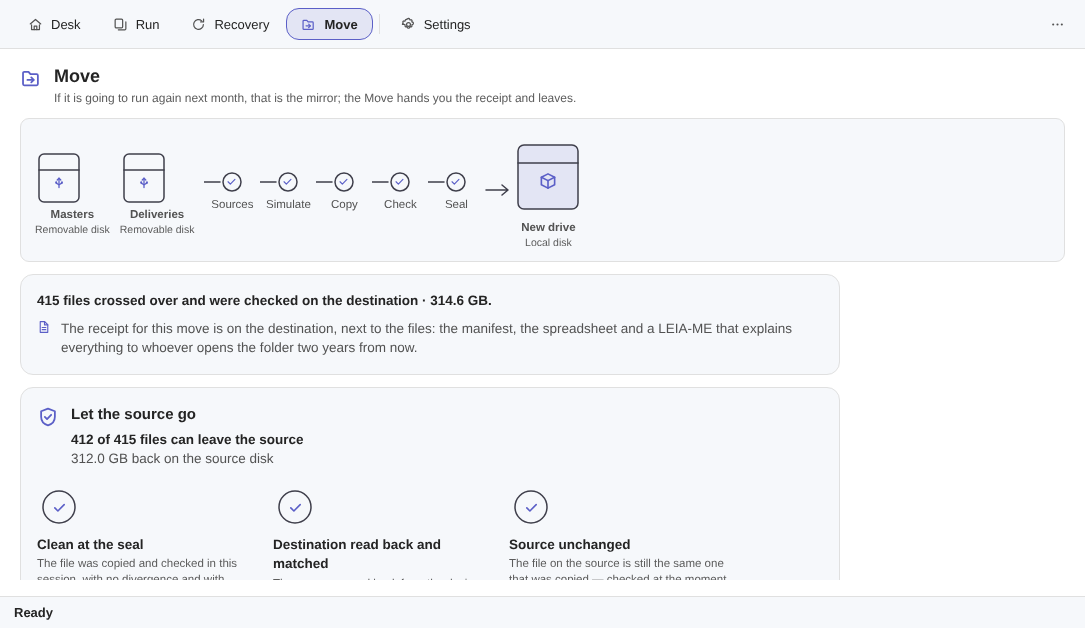
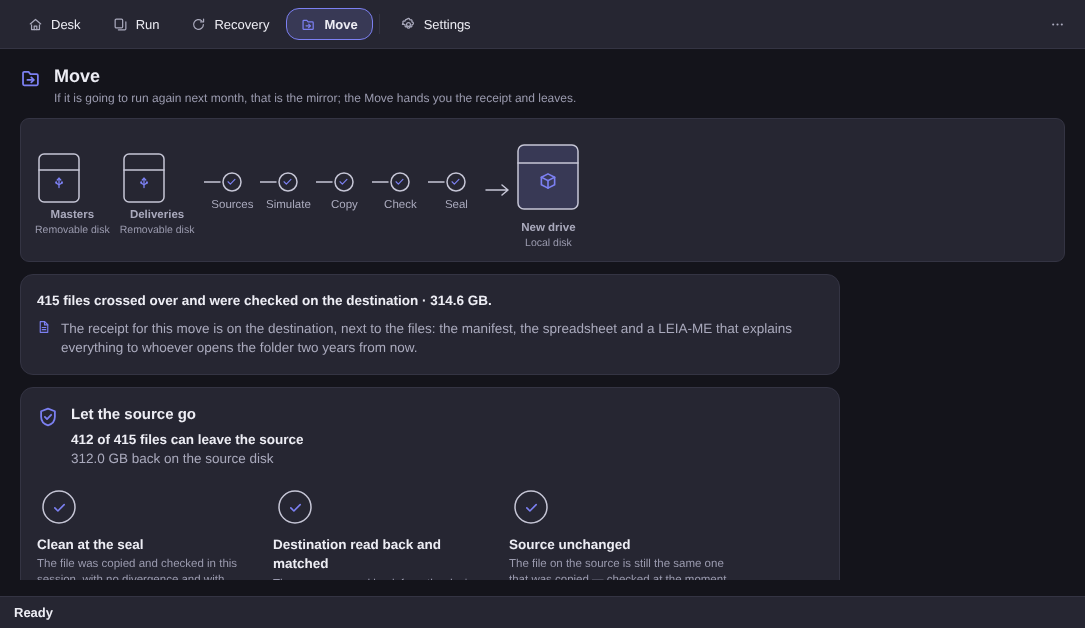
Move mode copies the folders you picked onto the new drive while you watch, with the crossing on screen: what has gone across, what is going now, what is left.
At the end it reads back what it wrote — off the new drive, not out of Windows’ cache — compares it with the fingerprint it took on the way, and closes the seal. Out comes a receipt in CSV that opens in any spreadsheet: one line per file, with the reason for every one that stayed behind.
And only then, if you ask, does it offer to release the source folders it has proven are whole over there.
“You told me this program never deleted anything”#
That is the right question, and it deserves its answer before any of the new bits — including the pretty ones.
One thing changed and one thing did not, and the two are worth separating. The mirror did not change: it still has no verb that deletes or overwrites a file of yours, and in the folders it mirrors the app only reads, first byte to last. A file that is left over in the vault still becomes a line in a report. Restoring still brings the file back beside what is already there, with a suffix, never on top of it.
What was born in 2.0 is a second mode, the Move, which exists for the day you swap drives — and it is only there, at the very end, that the app offers to release the source. We would rather write that down than let the old sentence turn into a half-truth.
There is one place in the whole product where it deletes a file of yours, it is called releasing the Move, and you open that door with your own hand. It is the most guarded thing we have ever shipped: a separate screen, which only opens once the seal is closed, where nothing comes pre-ticked, which never runs on its own, and which offers nothing it has not proven three times.
We are not going to apologise for it. The verb exists because moving-house day is real, and the honest alternative — drag, hope, and keep the old drive forever — is worse. What we can promise is the fence around it, and the fence is the rest of this post.
The receipt, and where it lives#
At the end of the crossing comes the seal, with five counts on a single line: copied, verified, divergences, refused on purpose, and failed. The line is indivisible on purpose — in this interface, “0 divergences” on its own does not exist.
Then comes the paper. The receipt is a CSV that opens in any spreadsheet, with one line per file — including the ones left behind, each with its reason. It lives in two places: on your PC, and beside the destination, next to a trilingual LEIA-ME.txt explaining what that folder is to whoever finds it ten years from now knowing nothing about any of this.
It also does not delete itself after N days, and that is a choice rather than an oversight: a move with no way back that leaves no record is a move with no witness. If you want to delete the receipt, delete it — it undoes nothing and breaks nothing. But it will not disappear on its own on the day you most need it.
And if you release the source, the release goes into the receipt too, with its date. It is the one thing with no way back that happened that day; a piece of paper that recorded everything except that would be a piece of paper lying by omission.
The three proofs, file by file#
The door does not offer you a folder: it offers every file that cleared all three proofs. And all three are done per file, never per batch.
Proof 1 — it is in the seal, clean. The file has to be in that crossing’s seal with no divergence. Anything that landed as a divergence, a refusal or a failure is never even offered.
Proof 2 — the destination was read back off the device. The app reads the file back off the new drive, off the device and not out of Windows’ cache, and compares it with the fingerprint written in the manifest.
Proof 3 — the source is still untouched. The source is checked at the second of the gesture. If someone touched it between the copy and the release, the file stays — because what it proved is no longer what is there.
Failed one of the three? It stays, it shows up named, and the screen says why. In practice you read a line like this:
“412 of 415 files can leave the source”
“3 stay on the source, and here is why”
Three files stuck in the middle of 415 is the sort of number a salesperson would bury. Here it is the product: the list of the ones that stay, with names and reasons, is the proof that the list of the ones that go was actually checked.
The last door: two screens, and nothing pre-ticked on either#
Where the source drive has a Recycle Bin, that is where the files go — and the number stays on screen, because the worst possible let-down is releasing 312 GB and watching the drive stay full:
“The Recycle Bin is on the SOURCE drive (D:). These 312 GB only come free once you empty it.”
And the caveat that has to come with it, not after it: the Bin has a quota. Whatever does not fit in it, Windows deletes for good — and the receipt records that.
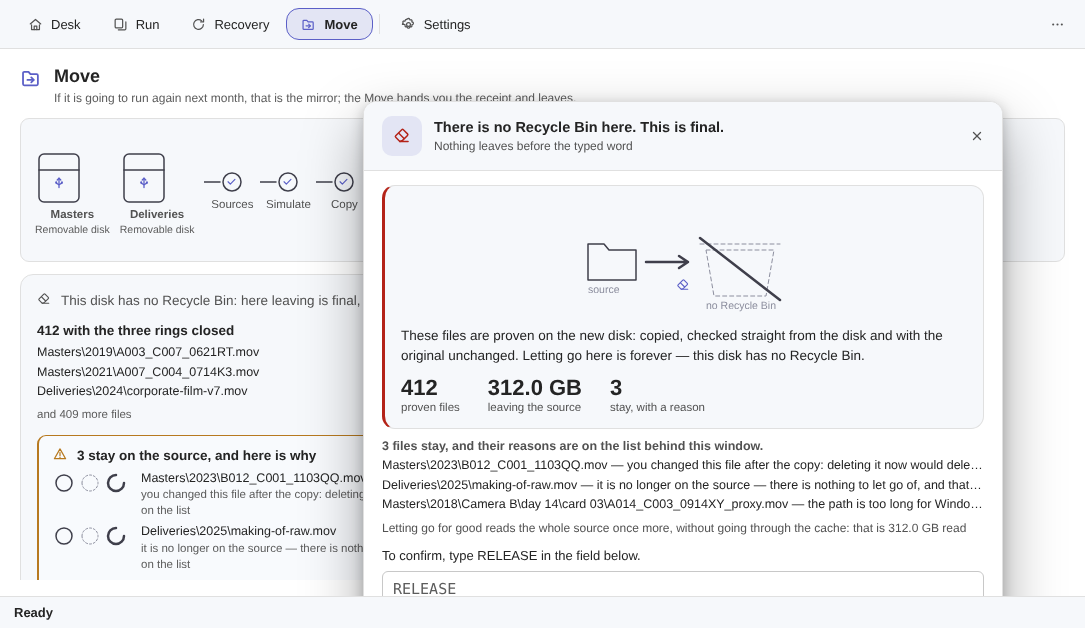
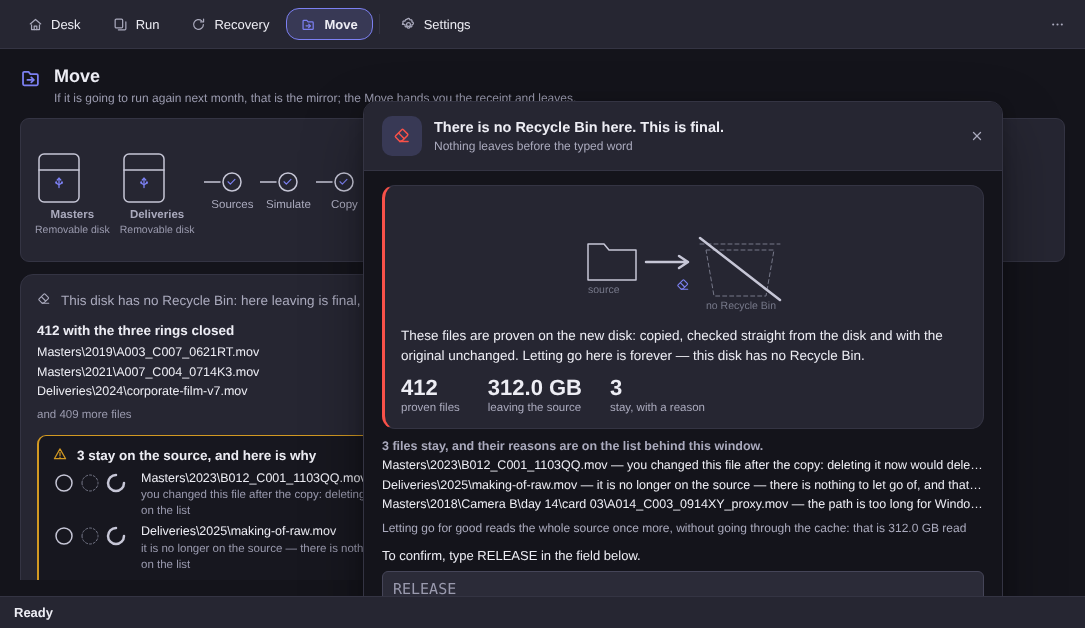
Where there is no Recycle Bin — a memory stick, an external drive, a memory card — the screen says out loud that this is permanent, shows the numbers, and asks you to type the word. On that path the proof goes up a step: the source is read back and re-checked against the manifest immediately before each file is let go, so that the window between the proof and the gesture is the smallest this design allows.
And there is one case where the door simply does not open: a source on a network drive stays untouched. Copying from a network folder works normally; releasing it does not happen. It is the only answer we can give without inventing certainty about a machine at the other end of a cable we cannot see.
Bought 1.0? 2.0 is yours#
Without paying again. It is the same one-time purchase.
There is no upgrade path to walk and no code to redeem: the licence is per product, not per version. 2.0 arrives through the normal update channel, and the absence of any ritual is the delivery.
The 1.x promises are all still standing, with new numbers on them: version history, a schedule and network-drive (NAS) destinations are still promised, still free, and are now the 2.x line. Nothing was cancelled. The Move went first because it has a date on it — the day the new drive arrives — and the other three don’t.
One line for anyone reading fast and about to conclude the wrong thing: pruning the mirror still does not exist. The Move releases the source, never the destination. The destination vault is not touched by it, and a vault that never deletes grows forever — still the most important caveat on the product page.
A mirror is next month; the Move leaves#
The border between the two modes fits in one sentence, and it is the same one we use in here to decide what belongs where: if it is going to run again next month, it is a mirror. The Move hands you the receipt and leaves — it does not run on its own and it cannot be scheduled, because a day with a date on it is not a routine.
The Elegant Vault page shows the crossing, the three proofs and both confirmation screens spelled out, and the FAQ answers, on the same page and with no small print, what stays out. Worth knowing before the crossing: this version does not copy permissions or file ownership, does not move anything between two PCs over the network, does not clone a partition — and schedules nothing. The changelog says what changed and when.
The trial runs 15 days on your PC, no card and no account, and the licence is a one-time purchase: US$ 12.99 at launch against US$ 24.99 list. The trial gate blocks exactly one verb, copying — verifying and restoring never expire, not after the 15 days and not for someone who never bought.
And if, having read all of that, your conclusion is “I would rather copy by hand and keep the old drive in a drawer”: that is a defensible decision, and it costs you a drawer. What we are offering is to trade the drawer for a receipt.