The disk fills up. A folder loses permission overnight. A file is open, so it is skipped. The cable comes out at three in the morning. And the program keeps saying "all good" until the day you need it. The rival of this product is not the other backup program — it is silent incompleteness.
Elegant Vault · verified backup mirror · and, when the new drive arrives, the Move with a receipt · Windows 10 and 11
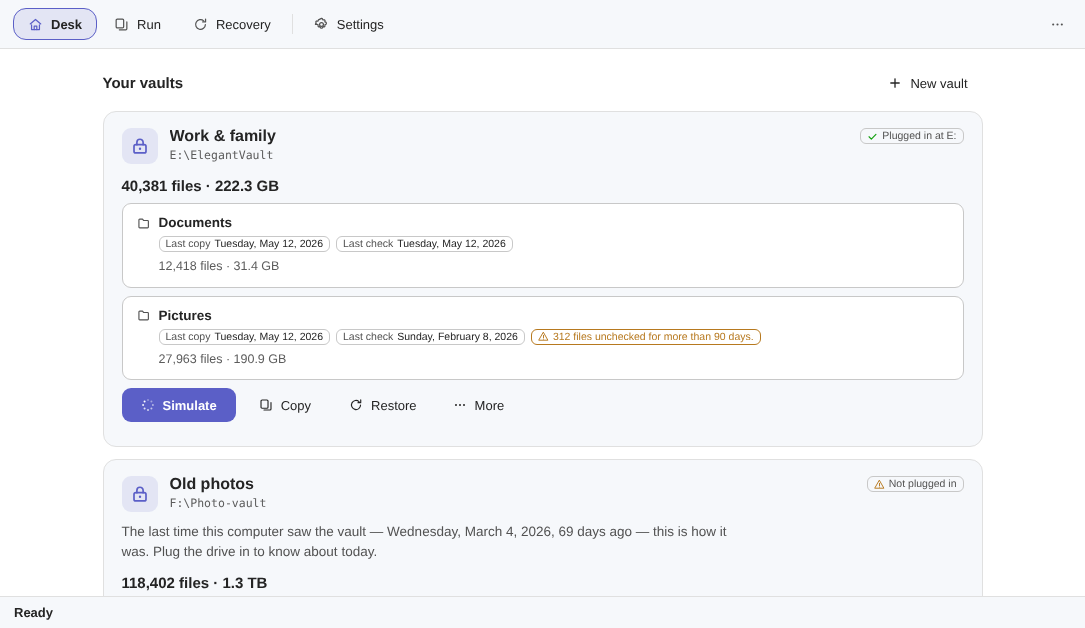
You pick folders and a drive you own. It copies everything 1:1 to that drive, verifies every byte with SHA-256 and shows you a seal with the counts. And your files come back through File Explorer on any PC — without this program.
Tick Documents, Photos, whatever you want protected — and point at an ordinary external drive. No cloud, no account, no odd formats.
Every file is copied under the same name and the same path, and gets a SHA-256 fingerprint on the way. At the source, it only reads — it never writes.
At the end, five numbers on one line say what went in and what stayed out. And one button brings 20 files back and checks them, in about 40 seconds.
No jargon so far. The rest of this page is the same thing in slow motion: how the copy becomes proof.
The category's number one failure is not a program that crashes. It is a program that finishes, reports success, and left things behind.
The five counts are one string in the source, not five labels a screen can pick from. "Zero mismatches" next to twenty-five refusals and twelve failures is not a result — it is a sentence with the ending cut off, and a test forbids cutting it.
Elegant File Explorer organizes files by rules; Elegant Vault keeps a verified copy of them on a drive of your own. Neither app requires the other, and nothing on this page needs the sibling installed.
Meet Elegant File Explorer"Copied" is a word a program writes about itself. This one swaps the word for a sum you can redo on your own, with a tool that already came with your Windows, on a computer where this app is not even installed.
Five pieces. None of them is an invention of ours: they are old durable-write practice, assembled in the order that makes silence impossible.
Every file is born with a temporary extension, has its bytes pushed to the medium — not to the cache, which is gone the moment the power is — and only then earns its definitive name, in a swap Windows does not leave half done.
A correct name inside the vault exists only if the file got there whole.
This is not an optimistic copy with a check bolted on afterwards. The order is the product.
SHA-256 a7f3…9c1b · in the same pass as the write
The bytes go past once: on their way to the vault the SHA-256 sum is computed over them, and each file becomes one line of the manifest.
There is no second reading to "generate the hash later" — so there is no window in which the file changed between the two passes and nobody noticed.
it may know less than the disk — never more
The vault's list is a text file that only grows, written in batches that are pushed to the disk.
The guarantee has a name and is tested as a mathematical property: the durable manifest is always a prefix of reality. Pull the cable whenever you like — the worst case is a manifest that knows less than the disk. Never more.
That is why unplugging mid-copy is a pause and not an error. Plug the drive back in and the copy carries on from where it stopped.
The app's own check re-reads the vault and compares it against the manifest, file by file, and says how long it will take before it starts. But the proof is not held hostage by the app: the LEIA-ME.txt written at the root of the drive teaches you, in three languages, how to check one file by hand with the certutil that already ships with Windows.
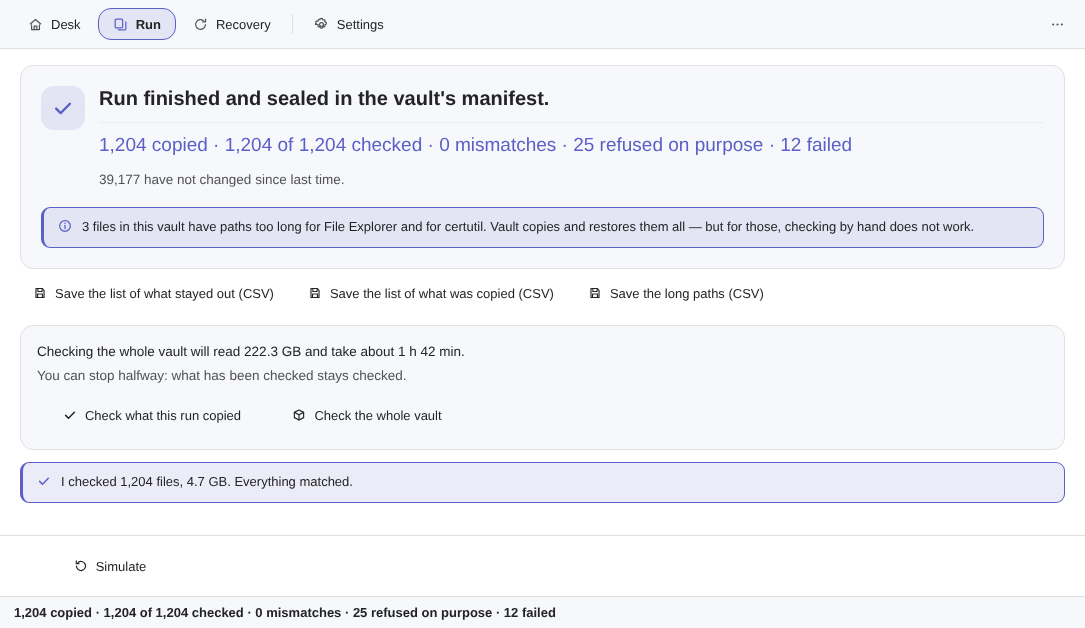
Where a path is too long for File Explorer and for certutil, the interface says so: Vault copies and restores those files, but for them the check by hand does not work.
The identity is written at the root of the destination, so a new drive letter, another dock, another PC or a reinstalled Windows changes nothing: the vault is still the vault, and the local index can be rebuilt from the destination. The program is the convenience; the drive is the backup.
None of these five pieces appears as an option you can switch on. They are the only path a write takes here — the engine has no fast mode that skips the fingerprint, because the fast mode is exactly where the silence would get in.
None of this depends on your attention or on a setting: it is the only way the program knows how to write. And when something cannot be verified, the Vault says so — it never pretends.
Every copy starts as a simulation — a plan with no writing in it at all. How many files go in, how many bytes, how long, how much room is left afterwards. And, with the same prominence, what is not going in, split into two buckets from the start: a refusal and a failure are not the same news.
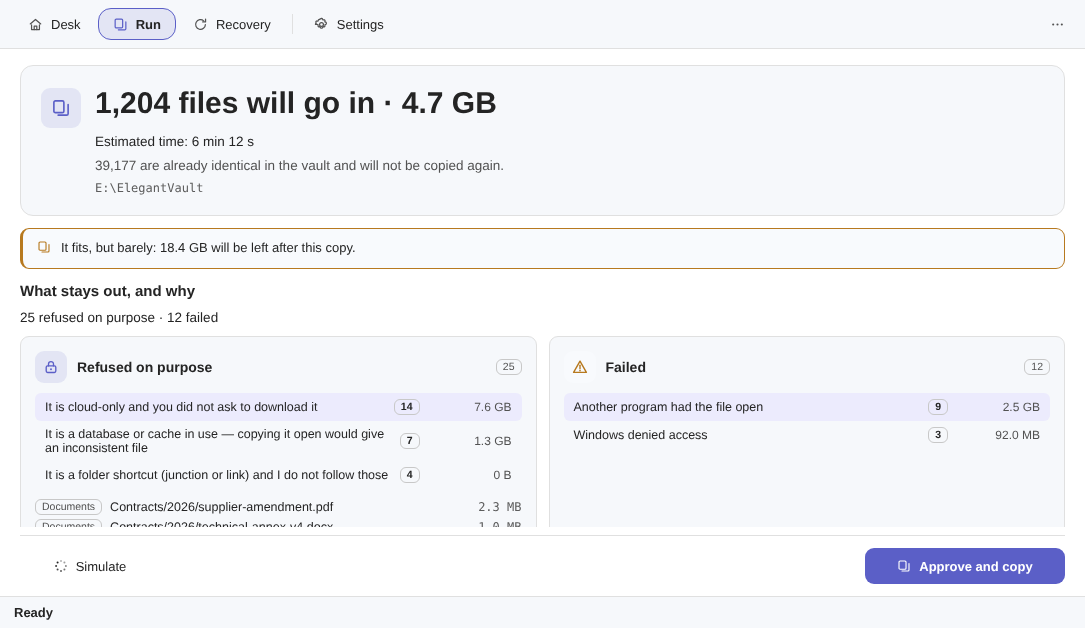
Real captures, in your theme. Click any one to open it full size.
A placeholder that would have to be downloaded before it could be copied. Vault reads the reparse tag rather than the file, so asking about it never triggers a download you did not ask for.
refused on purposeA file being written to right now would arrive inconsistent, and an inconsistent copy of a database is worse than no copy, because it looks like one.
refused on purposeA name the destination file system will not accept, a path beyond the limit, or a file over 4 GiB on FAT32. Refused with the reason, never truncated into something that only looks right.
refused on purposeVault runs as you, with your token, and does not use Shadow Copy — that would need an administrator. A locked file becomes a named line instead of a silent gap.
failedThe folder whose permissions changed and nobody noticed. It is counted, weighed and named, and it is the reason a plan that says "12 failed" is more useful than one that says nothing.
failedA bad sector, a cable that dropped, a drive that stalled. "I could not look" is never recorded as "I looked and found nothing" — those are three different states in the engine, never two.
failedBoth lists can be saved as CSV, next to the list of what actually went in — ordinary files you can keep, mail to yourself or open in a spreadsheet without this program. Speed is not on this page for a reason: it depends on your drive, your cable and your enclosure. The app estimates it on screen, on your machine, before it acts — and a screen estimate does not become a shop-window number.
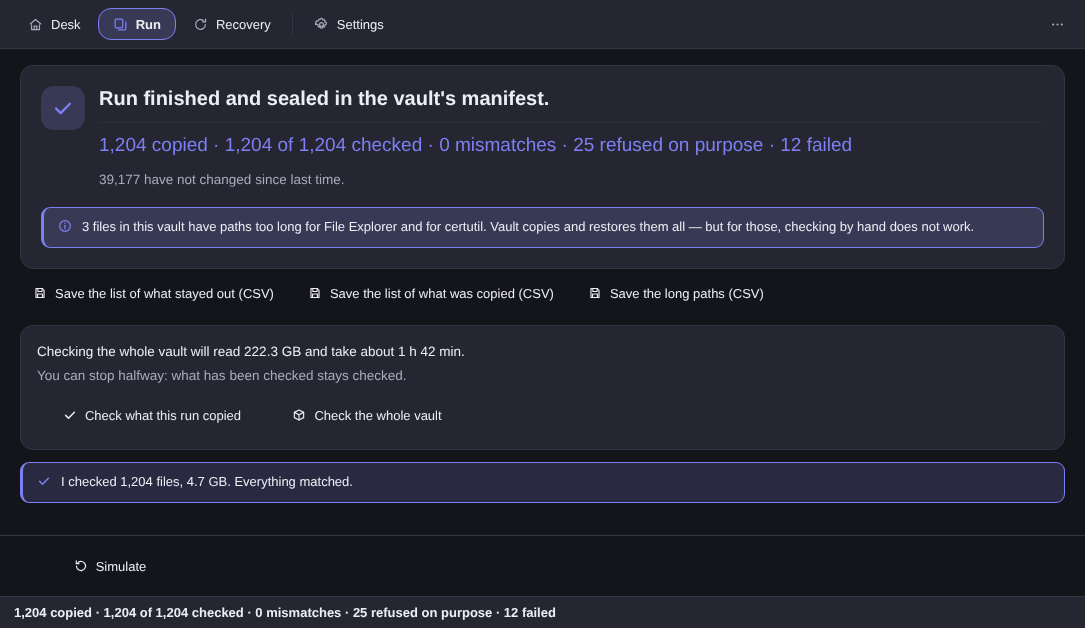
At the end of a run, the vault's manifest is sealed and the result is written once — copied, checked, mismatches, refused on purpose, failed. The same line is repeated in the status bar. If that seal could ever appear broken in half, it would be a maximum-severity bug in this product, not a cosmetic one.
Because the fingerprint was computed in the same pass as the write, verifying afterwards compares two independent readings of your file rather than the same one twice. The manifest is text. You can open it in Notepad.
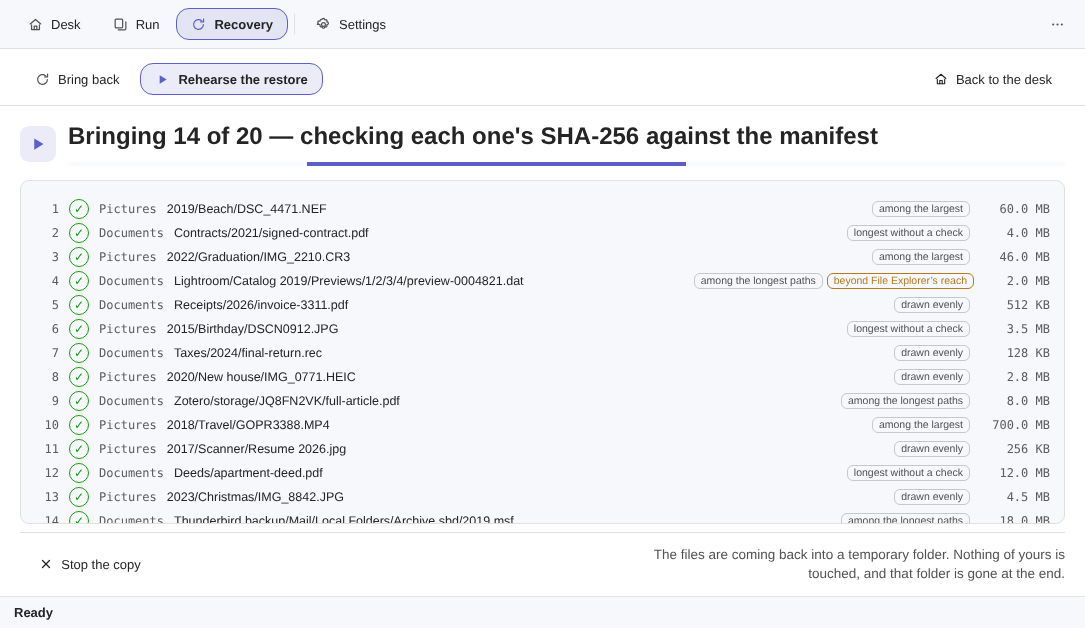
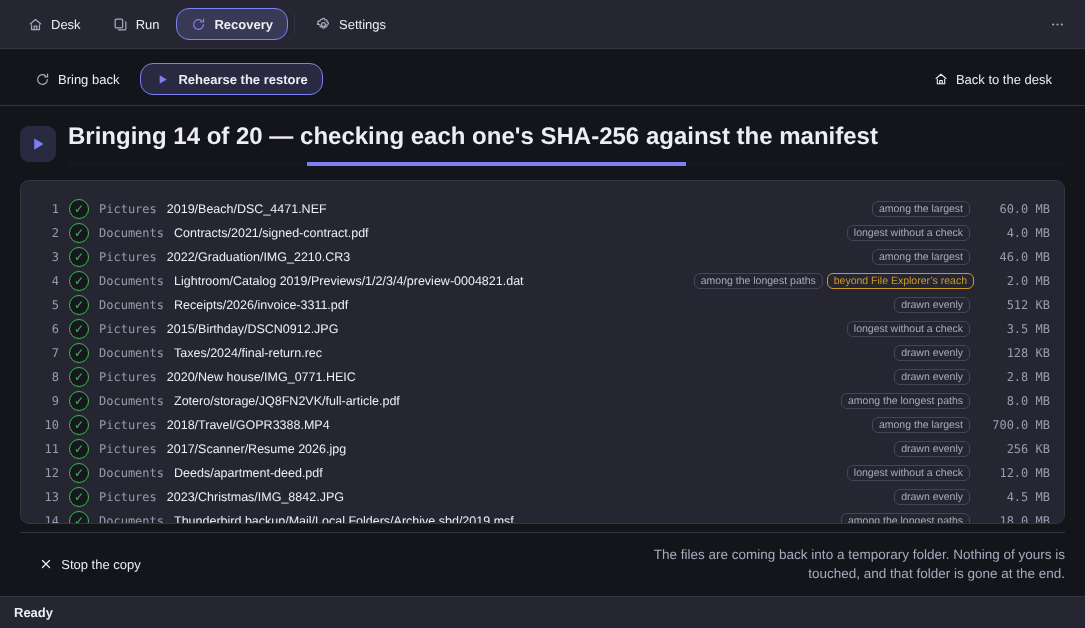
The rehearsal draws twenty files out of the vault, brings them back into a temporary folder, checks each one's SHA-256 against the manifest, shows you the result — and then deletes only what it created itself. Nothing of yours is touched, and the folder is gone at the end.
It is the whole product demonstrated at once: the copy arrived, the fingerprints match, and the files come back. The draw is stratified — the largest files, the ones longest without a check, the longest paths, and an even sample of the rest — so it cannot be gamed by leaving twenty easy files in a corner.
A rehearsal is not a restore, and the app never pretends otherwise: it is a sample, drawn without replacement, reported honestly. The real restore is its own screen, with its own simulation — file, folder or the whole vault — and it never overwrites anything: what comes back arrives beside what is already there, with a suffix, or in a new folder. Restoring and verifying never expire, not even after the trial.
The vault is not an archive, a container or a database. It is your folder tree, with the same relative paths, written as ordinary files — the format every PC on earth already reads.
The names _versions\ and _vault\ are reserved at the root of the destination from day one, so the features planned for 2.x arrive without a migration. Not a line of 1.0 uses the first one — it is a reservation, not a feature.
The new drive arrived. It copies onto the new drive, reads the destination back — off the device, not out of Windows’ cache — and closes the receipt. Only then, if you ask, does it offer to release the source folders it has proven are whole over there.
You pick the folders and the destination drive. The crossing shows the map: what has gone across, what is going now, and what is left. At the source, it still only reads.
At the end come the seal with the counts, and a receipt that opens in any spreadsheet — file by file, with the reason for every one that stayed behind.
A separate screen, which only opens after the seal, and nothing on it comes pre-ticked. What it offers is the source — the destination vault is never touched.
The door does not offer you a folder: it offers every file that cleared all three. One of them failed? The file stays, it shows up named, and the screen says why — “412 of 415 files can leave the source” and, right below it, “3 stay on the source, and here is why”
The file has to be in that crossing’s seal, clean. Anything that landed as a divergence, a refusal or a failure is never even offered.
The app reads the file back off the new drive — off the device, not out of Windows’ cache — and compares it with the fingerprint written in the manifest.
The source is checked at the second of the gesture. If someone touched it between the copy and the release, the file stays — because what it proved is no longer what is there.
If it is going to run again next month, it is a mirror. The Move hands you the receipt and leaves — it does not run on its own and it cannot be scheduled.
In the folders it mirrors, this app only reads. There is one place in the whole product where it deletes a file of yours, it is called the Move, and you open that door with your own hand.
It is structural, and it is the decision the whole product is built around. The worst bug a backup program can have is the one that destroys the backup — so the mirror simply does not contain the code that could. Writing into a mirrored source is a banned call in the sources, and the sweep that proves it runs on every build.
There are six commented exceptions. Five of them have no byte of yours inside: they touch artefacts the app made itself — its own temporary file, its own rehearsal folder, its own catalogue.
The sixth exception exists, it is called the Move release, and it is the only one in the product that touches a file of yours. It is the most guarded of the six: the architecture test checks the three proofs as a precondition, and a code path that releases without them fails the build.
No verb in the mirror deletes, moves or renames a file of yours. The read side is read-only by construction, not by policy.
The simulation is a pure function with no writing in it, and the copy is a second gesture. Two gestures, always — there is no one-click that skips the numbers.
A temporary name, then a flush that pushes the bytes to the actual disk rather than the cache, and only then the final name. A yanked cable leaves no half-file wearing a real name.
What the manifest promises has already arrived. That is what makes the vault trustworthy after a crash, and it is checked in the build as a property, not as an anecdote.
You deleted something at the source? The copy in the vault stays, and shows up in a report with its size. Deciding what to do with it is yours; 2.0 still has no code that could do it for you.
What comes back arrives beside what is already there, with a suffix, or in a new folder. A restore that silently replaces the good file with an old one is the second-worst bug in this category, and it is unbuildable here too.
It does not run on its own, it cannot be scheduled and nothing on it comes pre-ticked. The release screen only opens after the seal; every file needs the three proofs; whatever does not clear stays, named. Where there is no Recycle Bin, the word “permanent” appears on screen — and the source is read back before anything is let go.
Integration is a bonus and never a toll. What is not genuinely available on your machine does not appear at all: no dead buttons, no notice explaining what you are missing.
At the end of a copy, a check or a restore, the folder opens with the file already selected — inside Elegant File Explorer, if you have it.
If Elegant Paper or Elegant Photo Cleaner is installed, the folders where they keep your work are suggested as sources when you create the vault — ticked, and easy to untick.
Vault publishes what it covers for the family to read, but the other side has no verb for it yet. When it does, it gets counted like the rest — and not one day before.
Elegant Vault is on the Microsoft Store. One price, paid once — no subscription and no renewal.
No. The app has no way to connect to the internet — the vault is a drive you plugged in yourself. The only connection that exists is the licence and 15-day trial check against the Microsoft Store, made by Windows' own API, and it is fail-open: if the Store cannot be reached, the access you already had stays.
Overwriting, never — nowhere, not in the mirror, not on a restore. Deleting, only if you say so, and only in one place: after a Move, the app offers to release the source folders it has proven are whole at the destination. It is a separate screen, it only opens once the seal is closed, and nothing on it comes pre-ticked. Every file has to clear three proofs — be in the seal with no divergence, have its destination read back off the device and match the manifest, and have its source untouched at the second of the gesture. Whatever does not clear stays, named, with the reason. Where the drive has a Recycle Bin, that is where it goes; where it has none, the screen says this is permanent and asks you to type the word. In the mirror — which is what the app does every day — nothing is deleted and nothing is overwritten, and that has not changed.
One thing changed and one thing did not, and the two are worth separating. The mirror did not change: it still has no verb that deletes or overwrites a file of yours, and that rule is not a promise we make with our mouths — it is checked automatically before any version leaves here. What was born in 2.0 is a second mode, the Move, which exists for the day you swap drives — and it is only there, at the very end, that the app offers to release the source. We would rather write that down than let the old sentence turn into a half-truth. If you bought 1.0, 2.0 is yours, free.
Yes, and that is the point. The vault is an ordinary folder tree with the same relative paths as the source. Any PC with File Explorer opens it and drags files back. There is no container, no database and no proprietary format in the middle. A trilingual LEIA-ME.txt written at the root of the drive explains how to drag files back and how to check a fingerprint by hand with certutil, which already ships with Windows.
That is a pause, not an error. Every file is born under a temporary name, is pushed to the actual disk rather than to the cache, and only then gets its final name. The manifest is always a prefix of reality: it never lists a file that did not arrive whole. Plug the drive back in and the copy resumes where it stopped.
Not yet, and we would rather say it than let you find out. The vault protects you against a drive that dies, not against saving over a good file yourself. File versions are planned for 2.1, which is a free update for anyone who bought. The format written to the drive already reserves the layout for them, so the update will not need a migration. 2.0 arrived ahead of versions, the schedule and NAS — the three are still promised, still free, and they are now the 2.x line. The Move went first because it has a date: the day the new drive arrives.
No. There is no scheduler, no background service and no startup task. The market's number one complaint about backup is the run that failed in silence, so this product sells the opposite: a backup you watch happen. Plugging the vault drive in with the app open opens the simulation; the copy itself waits for your click. Scheduling is planned for 2.2. And the Move is never schedulable either: it is a day with a date, not a routine.
A file another program is holding open, and a file that exists only in the cloud. Both stay out by name, with the reason and the bytes: there is no volume snapshot here, because it would need administrator rights that no app of this house asks for, and copying a cloud-only file means downloading it whole, so that decision is yours and is taken folder by folder. A very long path is copied and restored normally — it is File Explorer and certutil that cannot reach those paths, and the app says how many files are in that state.
Not in this version: the destination is a local mounted drive. A sleeping network share can block inside Windows itself for the best part of a minute, and shipping that without the engineering it needs would be a freeze you would rightly blame on us. Network destinations are 2.1–2.2 work, inside the 2.x line, which is a free update.
No — it tells you, which is the part nobody else does. Checking the whole vault says which files diverged and leaves the decision to you; there is no parity data and no self-healing in this version. And verifying proves the copy, not the read: if the source was already handing over corrupted bytes, the vault faithfully receives and verifies a corrupted copy.
A vault that never deletes grows forever. Files you removed at the source stay in the vault as report lines with their size added up, never as an automatic deletion — and renaming a 40 GB folder at the source creates a second 40 GB tree instead of moving the first. Pruning with guards and rename matching arrive together in 2.1, or not at all — and mirror pruning still does not exist: the Move releases the source, never the vault.
No. A vault kept in the same room as the computer does not protect against fire, theft or a lightning strike — keep more than one copy, in more than one place, and Vault helps with one of them, not with all. The vault is not encrypted either: anyone holding the drive can read it, which is the very property that makes the copy readable on any PC without this program. If the drive travels, encrypt the volume with the tool your edition of Windows provides.
Restoring and verifying never expire. When the trial ends without a purchase, the gate blocks only the verb that copies: bringing your files back, checking the vault and rehearsing a restore keep working, forever. A backup that holds hostage the files of someone who did not pay is indefensible.
No. Elegant Vault is complete on its own. If the sibling is installed, the app can open the folder you just restored with the file already selected. Whatever is not genuinely available on your machine does not appear at all: no dead buttons and no notice explaining what you are missing.
Elegant Vault copies your folders to a drive of your own, proves file by file that the copy arrived whole, and lets you watch it happen — then brings twenty of them back in forty seconds to show you it works.
On the Microsoft Store. Windows 10 version 1809 or newer, and Windows 11.
 Elegant